Nitte (Deemed to be University) manages a wide network of educational institutions, hospitals, and academic departments across Karnataka. To support this workforce, the university operates a centralized digital HR platform known as NITTE DAKSHA.
Accessible at https://nitteonline.co.in/hr/login.mps, DAKSHA serves as the official Human Resource Management System for employees of Nitte (DU) and its affiliated institutions. The portal provides secure access to payroll, leave, employment records, and performance modules — all from one dashboard.
Let’s walk through how NITTE DAKSHA works, login steps, key features, benefits, and common FAQs.
What Is NITTE DAKSHA?
NITTE DAKSHA is the internal HRMS platform developed and maintained by the IT Department of Nitte (Deemed to be University). It centralizes employee data such as personal profiles, salary slips, leave balances, service history, and appraisal records.
The system follows a simple idea: one employee, one digital HR profile.
Each staff member logs in using their Employee ID, which links all employment-related information into a single secure account. This removes the need for manual HR requests for routine tasks.
Access is restricted strictly to authorized Nitte employees.
NITTE DAKSHA Portal Login Process
Employees can access DAKSHA through: https://nitteonline.co.in/hr/login.mps
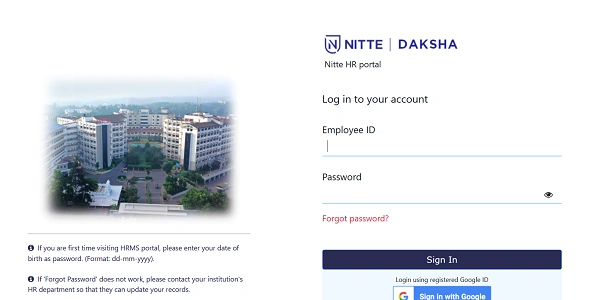
Official Login Details
- User ID: Employee ID
- Password: Personal password (default DOB for first-time users)
- Alternative Login: Registered Google ID (if linked to institutional account)
First-Time Login Instructions
If you are logging in for the first time:
- Open co.in/hr/login.mps.
- Enter your Employee ID.
- Use your Date of Birth as the temporary password (format: dd-mm-yyyy).
- Click Login.
Important Security Note
After your first successful login, immediately change your password to a custom one to protect your account.
Key Features of NITTE DAKSHA HRMS
DAKSHA provides Employee Self-Service tools designed for academic and administrative staff.
1. Payroll
View and download monthly payslips along with tax-related documents.
2. Leave Management
Apply for leave online and track current leave balances in real time.
3. Employment Records
Access and verify personal information, bank details for salary credit, and service history.
4. Performance Management
Participate in annual appraisal cycles and review performance feedback digitally.
Benefits of NITTE DAKSHA
From an HRMS professional perspective, the platform delivers practical advantages.
1. Saves Time
Payslips, leave applications, and profile checks can be done online without visiting HR.
2. Improves Transparency
Employees can directly view their own employment records and appraisal status.
3. Paperless Administration
Most HR workflows are handled digitally, reducing paperwork.
4. Secure Access
Employee ID–based login with password protection keeps sensitive data safe.
5. Centralized Workforce Management
HR teams get a unified view of staff across all Nitte institutions.
Troubleshooting and Support
1. Forgot Password
Use the “Forgot password?” link on the login page to initiate a reset.
2. Incorrect Personal Data
If the reset option fails or your details are incorrect, contact your institution’s HR department for updates.
3. Technical Maintenance
The portal is designed and maintained by the IT Department, Nitte (DU).
Conclusion
NITTE DAKSHA plays a central role in managing the university’s academic and administrative workforce. By bringing payroll, leave, service records, and performance reviews into one secure platform, it replaces manual HR processes with digital efficiency.
For Nitte employees, https://nitteonline.co.in/hr/login.mps is now the primary gateway to HR services. In today’s digital campus environment, DAKSHA isn’t just an HR tool — it’s part of everyday professional life.
Frequently Asked Questions (FAQs)
Q1. Who can use NITTE DAKSHA?
A: Employees of Nitte (Deemed to be University) and affiliated institutions.
Q2. Can I log in using Google?
A: Yes, if your Google ID is linked to your institutional account.
Q3. Can I download old payslips?
A: Yes. Previous salary slips remain accessible after login.
Q4. What if I forget my password?
A: Use the reset option or contact your HR office.