The Government of Gujarat manages lakhs of employees working across departments, districts, schools, hospitals, and administrative offices. To bring transparency and efficiency into personnel administration, the state operates a centralized digital platform known as e-HRMS Gujarat.
Accessible at https://e-hrms.gujarat.gov.in/, this Human Resource Management System digitizes the complete employee lifecycle — from recruitment to retirement. In 2025–2026, the portal continues to serve as the backbone of workforce management for Gujarat government staff.
Let’s walk through how HRMS Gujarat works, login steps, key features, benefits, and common FAQs.
What Is HRMS Gujarat (e-HRMS)?
e-HRMS Gujarat is the official HR platform of the Gujarat Government. It centralizes employee information such as personal profiles, service history, salary data, leave records, performance appraisals, and property returns.
The system follows a simple concept:
one employee, one digital service record.
Each state government employee is provided a unique Employee ID or Username, which connects all professional data into a single electronic profile. This replaces physical service books and manual registers while improving transparency across departments.
The portal is also widely used for Anganwadi recruitment (ICDS), including merit list publication and application tracking.
HRMS Gujarat Portal Login Process
Employees can access HRMS through:
https://e-hrms.gujarat.gov.in/
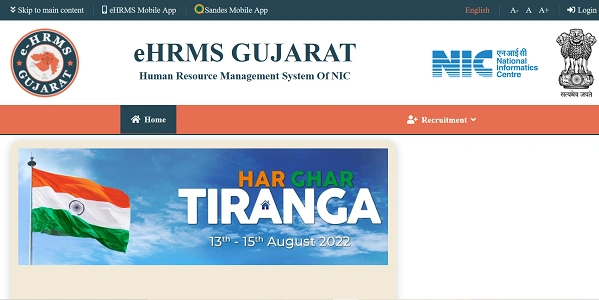
Official Login Details
- User ID: Employee ID / Department-assigned Username
- Password: Personal secure password
- Captcha: Must be entered exactly as shown
How to Login (Step by Step)
- Open your browser and visit e-hrms.gujarat.gov.in.
- Enter your Login ID.
- Type your Password.
- Fill in the Captcha
- Click Login to reach your dashboard.
For enhanced security, certain actions may require OTP verification sent to your registered mobile number.
First-Time Users
New employees must first be onboarded by their department’s Nodal Officer. Once your details are uploaded, you can register and create your own password.
Key Features of HRMS Gujarat (2025–2026)
e-HRMS Gujarat includes multiple modules designed to streamline HR operations.
1. e-Service Book
A digital repository of your complete professional history, including:
- Joining details
- Educational qualifications
- Family information
- Promotions and transfers
This replaces traditional paper service books.
2. Recruitment (ICDS / Anganwadi)
The portal is extensively used for Anganwadi Worker and Helper recruitment, including online applications and merit list publication.
3. Leave Management
Apply for various types of leave digitally and track approval status in real time.
4. Payroll & Payslips
Employees can download monthly salary slips and access GPF statements through integrated financial systems.
5. Performance Appraisal (APAR)
Submit and review Annual Performance Appraisal Reports online, reducing manual paperwork.
6. Annual Property Returns
State officers can file mandatory property asset declarations digitally through the portal.
Benefits of HRMS Gujarat
From an HRMS professional perspective, the platform delivers clear operational advantages.
1. Saves Time
Routine tasks like downloading payslips or checking service records now take minutes instead of office visits.
2. Improves Transparency
Employees can directly view their postings, promotions, and appraisal status.
3. Paperless Administration
Digital service books, online APAR, and property returns significantly reduce paperwork.
4. Secure Access
Captcha and OTP-based security help protect sensitive employee information.
5. Anywhere Availability
Being web-based, HRMS Gujarat can be accessed from any internet-enabled device.
Troubleshooting Common Issues
1. Forgot Password
Click Forgot Password on the login page. You’ll need your Employee ID and registered mobile number to receive a reset link.
2. Account Locked
Accounts may be temporarily locked after multiple failed attempts. Either wait for the cooling period or contact your department’s Nodal Officer.
3. Data Correction
If your e-Service Book contains errors, submit a formal request to your DDO (Drawing and Disbursing Officer) for correction.
Conclusion
HRMS Gujarat has become the digital backbone of employee management for the state government. By bringing e-Service Books, recruitment, payroll, leave, APAR, and property returns into one system, it replaces traditional paperwork with modern efficiency.
With enhanced security and self-service features, https://e-hrms.gujarat.gov.in/ gives Gujarat government employees direct control over their professional records. In 2025–2026, HRMS is no longer optional — it’s part of everyday working life across the state.
Frequently Asked Questions (FAQs)
Q1. Who can use HRMS Gujarat?
A: All Gujarat government employees whose details are registered in e-HRMS.
Q2. Is OTP mandatory?
A: OTP may be required for sensitive actions and security verification.
Q3. Can I download old payslips?
A: Yes. Previous salary statements are available after login.
Q4. Is this portal used for Anganwadi recruitment?
A: Yes. ICDS recruitment and merit lists are handled through e-HRMS.