Bihar Rural Development Society (BRDS), operating under the Department of Rural Development, Government of Bihar, manages a large workforce involved in rural infrastructure, livelihood programs, and development projects across the state. To handle employee administration efficiently, the department uses a centralized digital platform known as BRDS HRMS.
Accessible at https://brdshrms.bihar.gov.in/, this Oracle PeopleSoft–powered Human Resource Management System acts as the official gateway for payroll, leave, attendance, and employee service records.
Let’s walk through how BRDS HRMS works, login steps, key features, benefits, and common FAQs.
What Is BRDS HRMS?
BRDS HRMS is the official internal HR platform for employees of the Bihar Rural Development Society. It centralizes staff information such as salary slips, attendance logs, leave records, posting details, and personal profiles into one secure system.
The platform follows a simple idea:
one employee, one digital service profile.
Each staff member logs in using their unique employee ID, which links all professional data into a single dashboard. This replaces manual registers and paper files with a transparent digital workflow.
Access is restricted strictly to authorized BRDS employees.
BRDS HRMS Portal Login Process
Employees can access HRMS through: https://brdshrms.bihar.gov.in
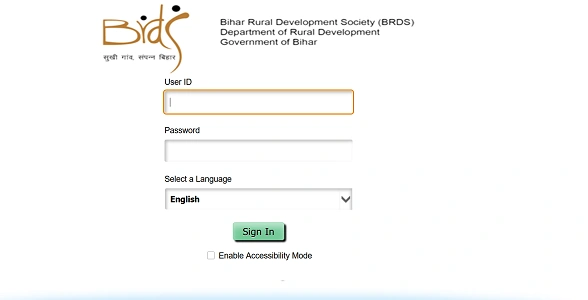
Official Login Details
- User ID: Employee Identification Number
- Password: Secure personal password
- Language Selection: English (and other available options) before login
How to Login (Step by Step)
- Open your browser and visit bihar.gov.in.
- Enter your User ID.
- Type your Password.
- Choose your preferred Language from the dropdown.
- Click Sign In to access your dashboard.
If required, you may also enable Accessibility Mode for screen reader support or enhanced visibility.
Key Features of BRDS HRMS
As an Oracle PeopleSoft–based system, BRDS HRMS provides structured Employee Self-Service and administrative modules.
1. Payroll & Salary
View salary structures, download monthly payslips, and check historical payment records.
2. Leave Management
Apply online for different types of leave and track approval status from senior officials.
3. Employee Profile
Access and update service records including designation, current posting, and contact details.
4. Attendance
Check daily attendance logs and duty shift records maintained by the department.
5. Reporting & Analytics
Administrative users can monitor workforce distribution and project-based staffing through built-in analytics tools.
Benefits of BRDS HRMS
From an HRMS professional perspective, the platform delivers practical advantages.
1. Saves Time
Payslips, leave applications, and profile checks are handled online, reducing office visits.
2. Improves Transparency
Employees can directly view their own attendance, salary, and service data.
3. Paperless Administration
Digital workflows replace physical files and manual registers.
4. Secure Access
Login-based authentication helps protect sensitive government employee information.
5. Centralized Workforce Management
The department gains a unified view of staff across districts and projects.
Troubleshooting and Support
1. Login Failure
Double-check your User ID and ensure Caps Lock is off. If your account is locked after multiple attempts, contact your district-level HR coordinator.
2. Accessibility Issues
Use updated versions of Google Chrome or Microsoft Edge and ensure JavaScript is enabled.
3. Official Support
For technical problems, employees should contact the IT Cell, Bihar Rural Development Society, at the state headquarters in Patna.
Conclusion
BRDS HRMS has become the digital backbone of workforce management for Bihar Rural Development Society. By bringing payroll, leave, attendance, and service records into one Oracle PeopleSoft system, it replaces manual HR processes with structured digital efficiency.
For BRDS employees, https://brdshrms.bihar.gov.in/ now serves as the primary gateway for managing professional records in 2026.
Frequently Asked Questions (FAQs)
Q1. Who can use BRDS HRMS?
Ans: Only employees of Bihar Rural Development Society.
Q2. Can I download old payslips?
Ans: Yes. Previous salary records are available after login.
Q3. Is language selection mandatory?
Ans: Yes. You must select a language before signing in.
Q4. What if my service details are incorrect?
Ans: Report discrepancies to your district HR coordinator for correction.
![List of Traditional Dress of Karnataka [For Men and Women]](https://hrmsunfold.com/wp-content/uploads/2026/06/List-of-Traditional-Dress-of-Karnataka-For-Men-and-Women.jpg)
![List of Traditional Dress of Jharkhand [For Men and Women]](https://hrmsunfold.com/wp-content/uploads/2026/06/List-of-Traditional-Dress-of-Jharkhand-For-Men-and-Women.jpg)