The Food Corporation of India (FCI) manages one of India’s largest public-sector workforces, spread across zones, regions, depots, and offices nationwide. To streamline employee administration and reduce manual paperwork, FCI introduced its Human Resource Management System (HRMS) — a centralized digital platform for managing staff records, payroll, leave, and service-related data.
Employees primarily use https://www.hrmsfci.in/ for core HR services, while service records and administrative profiles are handled through the Employee Relation Services (ERS) sub-portal at https://ers.hrmsfci.in/.
Together, these platforms form FCI’s complete HR digital ecosystem, allowing regular employees to manage most HR activities online.
Let’s walk through how HRMS FCI works, login steps, key features, benefits, and common FAQs.
HRMS FCI Portal Login Process
Employees can log in through either: https://www.hrmsfci.in (Main HRMS Portal)
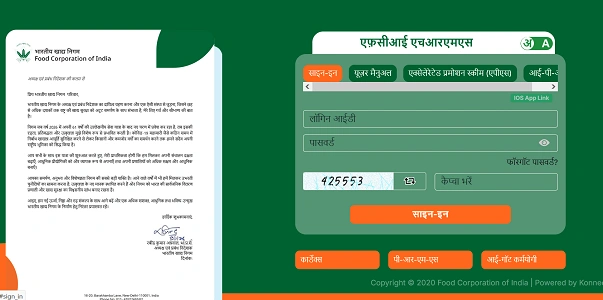
https://ers.hrmsfci.in/ (ERS Service Record Portal)
Steps to Login:
- Open your browser and visit either portal.
- Enter your 6-digit Employee Number (as per IPAS/salary records).
- Type your Password.
- Complete the captcha verification.
- Click Login.
After successful login, you’ll reach your dashboard with access to HR services based on your role.
First-Time Login or Password Reset
For first-time access or forgotten passwords, the system may send an OTP to your registered mobile number. HRMS FCI uses OAuth 2.0 security and OTP verification, especially during password resets or MPIN generation.
FCI also provides a mobile HRMS app (Android/iOS) where employees can log in using an MPIN after initial registration.
Key Features of FCI ERS Portal
The ERS sub-portal focuses mainly on service record management. Once logged in, employees can access:
1. Employee Profile
Displays personal details, Date of Birth, official email ID, and basic service information.
2. Posting History
Shows complete past and present postings, including Zone, Region, and office locations.
3. Designation Tracking
Records all designations held by the employee, along with exact dates of appointment or promotion.
4. Competency & Training
Employees can view courses attended, competency assessments, and download training certificates.
5. Joining Details
Tracks joining and relieving dates for every transfer or posting.
General HRMS FCI Services (Integrated)
Alongside ERS, the core HRMS portal provides broader HR functions:
1. Payroll & Payslips
Download monthly salary slips and view IDA/CDA salary structures.
2. Leave & Attendance
Apply for various leave types (LAP, LHAP, etc.) and check attendance through biometric integration.
3. Performance Management (APAR)
Access Annual Performance Assessment Reports for Category I, II, and III employees.
4. Pension & Retirement Benefits
Includes retirement calculators and post-retirement medical scheme details.
5. Immovable Property Return (IPR)
Employees can file property declarations and track their approval status online.
Benefits of HRMS FCI
From an HRMS professional’s perspective, the platform offers clear operational advantages.
1. Saves Time
Routine tasks like downloading payslips or checking service records no longer require visits to HR offices.
2. Improves Transparency
Employees can see their own posting history, designations, and performance records, reducing disputes and delays.
3. Anywhere Access
Being web-based, HRMS FCI can be accessed from home, office, or any location with internet connectivity.
4. Paperless Administration
Digital records reduce dependency on physical files, improving efficiency and lowering the risk of data loss.
5. Better Accuracy
Centralized data entry minimizes manual errors and duplication across departments.
6. Secure Employee Data
Login credentials, OTP verification, and OAuth 2.0 security ensure employee information remains protected.
Troubleshooting & Support
If you face login issues, OTP problems, or need to update your registered mobile number, FCI provides dedicated support:
PRMS Helpdesk:
- 011-43527554 / 011-43527582 (Mon–Sat, 9:30 AM – 6:00 PM)
IT Support Email:
- hrmsfci@gmail.com
WINGS Support (System Issues):
- wingshelpdesk@fci.gov.in
Frequently Asked Questions (FAQs)
Q1. Who can use HRMS FCI?
Only regular employees of the Food Corporation of India with valid employee numbers.
Q2. Is HRMS available on mobile?
Yes. FCI offers a dedicated HRMS mobile app with MPIN-based login.
Q3. Why does login fail sometimes?
Common reasons include incorrect credentials, captcha errors, or unregistered mobile numbers for OTP verification.
Q4. Can I download old payslips?
Yes. Previous salary slips are available in the HRMS dashboard.
Q5. What if my service details are incorrect?
You should contact your regional HR office or raise a request through ERS for correction.
Conclusion
HRMS FCI represents a major shift toward digital workforce management within the Food Corporation of India. By integrating payroll, leave, performance, and service records into one system, it replaces traditional paperwork with online efficiency.
From posting history to payslips and retirement planning, employees now have direct access to their professional data. For FCI staff, HRMS is no longer just an HR tool — it’s an essential part of daily work life.
Keeping your profile updated on hrmsfci.in and ers.hrmsfci.in can save time, prevent future issues, and give you better control over your service records.
![List of Traditional Dress of Haryana [For Men and Women]](https://hrmsunfold.com/wp-content/uploads/2026/06/List-of-Traditional-Dress-of-Haryana-For-Men-and-Women.jpg)