MedPlus operates one of India’s largest pharmacy and healthcare retail networks, with employees working across stores, warehouses, and corporate offices. To manage this fast-moving workforce, the company uses MHS HRMS — a mobile-first Human Resource Management System designed for high-frequency daily use.
Unlike traditional HR portals, MHS HRMS is primarily accessed through a dedicated mobile app. While a web interface exists at https://ohs.medplusindia.com/, full HRMS functionality is available only through the MHS HRMS mobile application.
As of 2026, the platform has received major security and usability upgrades, making it the central hub for attendance, payslips, leave, and internal job postings.
Let’s walk through how MHS HRMS works, login steps, key features, benefits, and common FAQs.
What Is MHS HRMS (MedPlus)?
MHS HRMS is the internal employee management system used by the MedPlus group. It centralizes staff information such as attendance, salary slips, leave records, and internal vacancies.
The system follows a simple idea:
one employee, one mobile-based HR profile.
Every MedPlus staff member logs in using either their registered mobile number or HRMS ID. The app is especially designed for pharmacy and warehouse teams who need quick access to attendance and payroll data.
Because this is a private corporate platform, access is limited strictly to MedPlus employees.
MHS HRMS Login Process (2026 Update)
Employees primarily access HRMS through the MHS HRMS mobile app (Developer: Optival Health Solutions Pvt. Ltd., Version 4.0).
A secondary web entry point exists at: https://ohs.medplusindia.com/
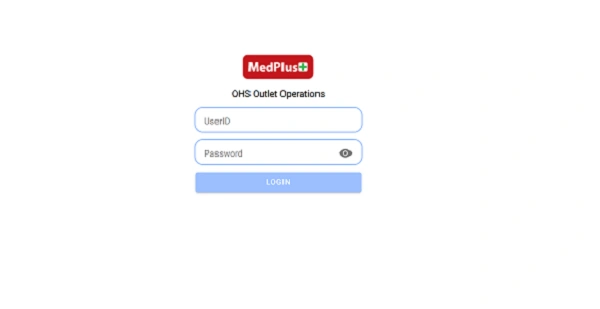
(Note: This mainly serves as a landing page for outlet operations and job applications.)
Two Secure Login Methods
Method A – OTP Login
- Open the MHS HRMS app.
- Enter your Registered Mobile Number.
- Receive a 6-digit OTP.
- Enter OTP to log in.
This method is commonly used by store and field staff for quick punch-in.
Method B – HRMS ID Login
- Enter your HRMS ID (Employee Code).
- Type your ADS or onboarding password.
- Complete mandatory OTP verification sent to your phone.
Both methods include Two-Factor Authentication (2FA) for security.
Key Features of MHS HRMS App
The MHS HRMS app is built for everyday operational use.
1. Geo-Fenced Attendance
Employees must be within a defined radius of their assigned MedPlus store or warehouse to Punch In. This prevents proxy attendance and ensures accurate shift tracking.
2. Leave Records
Apply for leave and monitor your remaining leave balance in real time directly from the app.
3. Digital Payslips
Download PDF salary slips straight to your phone without contacting HR.
4. Internal Job Postings
View openings for roles such as:
- Pharmacists
- Store Managers
- Marketing Executives
This encourages internal mobility and career growth.
5. Employee Self-Service
Basic profile access and HR updates are available inside the app, reducing dependency on branch HR teams.
Benefits of MHS HRMS
From an HRMS professional perspective, the MedPlus system offers clear operational advantages.
1. Designed for Mobile Workforce
Pharmacy and warehouse staff can manage attendance and payslips directly from their phones.
2. Faster HR Transactions
Leave applications, payslip downloads, and shift records take seconds.
3. Strong Security
OTP login, device binding, and geo-fencing protect sensitive employee data.
4. Paperless HR
No physical registers for attendance or salary slips.
5. Transparent Operations
Employees can see their own records, reducing disputes and confusion.
Troubleshooting Common Issues
1. “User Not Found” or Login Failed
This usually happens if:
- Your mobile number isn’t registered
- Your account hasn’t been activated
- Device binding needs reset
2. Device Binding (2026 Update)
Version 4.0 allows the app on only one registered device. If you change phones, IT must reset your binding manually.
HR Support Contacts
If problems continue:
- Email: wecare@medplusindia.com
- Phone: (040) 6700 6700
- Office Hours: Monday–Saturday, 9:00 AM to 7:00 PM
Conclusion
MHS HRMS has become the digital backbone of workforce management at MedPlus. With mobile-first attendance, geo-fenced punch-ins, digital payslips, and internal job listings, it replaces manual HR processes with real-time efficiency.
For MedPlus staff across stores and warehouses, the MHS HRMS app is not just an HR tool — it’s part of everyday work life in 2026.
Frequently Asked Questions (FAQs)
Q1. Who can use MHS HRMS?
A: Only MedPlus group employees.
Q2. Is the web portal enough?
A: No. Full HRMS features are available only on the mobile app.
Q3. Can I download old payslips?
A: Yes. Previous salary slips remain accessible in the app.
Q4. What if I change my phone?
A: You must contact IT to reset device binding.
![List of Traditional Dress of Ladakh [For Men and Women]](https://hrmsunfold.com/wp-content/uploads/2026/06/List-of-Traditional-Dress-of-Ladakh-For-Men-and-Women.jpg)