Applying for pension in e-HRMS 2.0 is no longer a paper-heavy, last-minute process. Since 2024, the Government of India has fully integrated e-HRMS with the Bhavishya portal. The aim is simple but ambitious: your Pension Payment Order (PPO) and retirement benefits should be ready on the day you retire.
This guide explains how to apply for pension in e-HRMS, what must be completed before the option appears, and how the timeline works so you don’t miss anything critical.
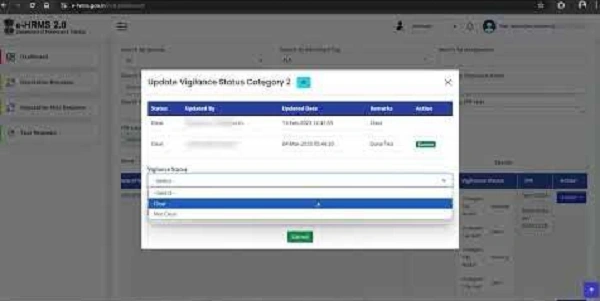
First, Understand How Pension Works in e-HRMS
You do not apply for pension suddenly at retirement.
The system starts preparing your case 12–15 months before superannuation.
e-HRMS acts as the service-record authority, while Bhavishya handles:
- Pension calculation
- PPO generation
- Coordination with PAO and bank
You, the employee, must ensure your data is complete, correct, and verified.
Mandatory Prerequisites (Non-Negotiable)
Before the pension module becomes active, your HRMS profile must be 100% clean.
Profile Completion
In e-HRMS, all these sections must show Completed / Verified:
- Personal Details
- Service History
- Pay & Increment records
- Leave Account
- Family Details
- Nomination (GPF, Gratuity, GIS)
If even one section is incomplete, pension application will not proceed.
Service Book Verification
Your digital Service Book must be:
- Fully updated
- Verified by the Head of Office (HOO)
Any missing promotion, increment, or pay fixation will delay pension.
Bhavishya Auto-Registration
For normal superannuation, the system automatically registers you on Bhavishya:
- Usually 12–15 months before retirement
- You’ll see a retirement banner or pension alert in e-HRMS
If this does not happen, you must immediately inform your establishment section.
Step-by-Step: How to Apply for Pension in e-HRMS
Step 1: Log in to e-HRMS 2.0
Go to the official e-HRMS portal and log in using e-Parichay (NIC / gov email authentication).
Step 2: Open Retirement / Pension Module
From your dashboard, look for:
- Retirement
- Pension
- Superannuation Benefits
Clicking this usually:
- Opens Bhavishya in a new window, or
- Loads the pension form directly inside e-HRMS
Both are normal.
Step 3: Fill Online Pension Form (Form 6-A)
You will be asked to complete Form 6-A, the Single Simplified Pension Application Form (introduced after 2024).
This replaces multiple older forms and pulls most data automatically.
Key Sections in Form 6-A
1. Personal Details
Auto-fetched from HRMS (read-only)
2. Pension Type
Superannuation / Voluntary (as applicable)
3. Commutation Option
You may choose to commute up to 40% of pension
4. Bank Details
Bank name, branch, account number for pension credit
5. Family Pension Details
Spouse, dependents, DOBs (must match HRMS family data)
Step 4: Upload Mandatory Documents
You will need scanned copies (clear and recent) of:
- Joint photograph with spouse
- Specimen signature or thumb impression
- Descriptive roll
- Identification details (as required)
Incorrect or unclear uploads cause objections later.
Step 5: e-Sign and Submit
Once all sections are complete:
- Use Aadhaar-based e-Sign
- Submit the pension application
After submission, you cannot edit it yourself.
The file moves digitally to your Head of Office (HOO).
What Happens After You Submit?
The process is fully online and role-based.
Pension Workflow
1. Employee submits Form 6-A
2. Head of Office (HOO) verifies and forwards
3. Pay & Accounts Office (PAO) checks calculations
4. e-PPO is generated
5. PPO is shared with:
- Pension disbursing bank
- Your Bhavishya dashboard
- DigiLocker
Official Pension Timeline (Very Important)
| Time Before Retirement | What Happens |
| 12–15 months | System flags you for retirement |
| 6 months | You must submit Form 6-A online |
| 4 months | HOO forwards case to PAO |
| Last working month | e-PPO issued |
| Retirement day | Pension starts, PPO available |
Missing the 6-month window is the biggest cause of delayed pension.
How You Receive Pension & PPO
After approval:
- Pension starts automatically in your bank account
- e-PPO is available on:
- Bhavishya portal
- DigiLocker
No physical PPO is required in most cases.
Common Problems & How to Avoid Them
Pension option not visible
→ Profile or service book not fully verified
Form rejected by HOO
→ Data mismatc
→ Pension form submitted late or service gaps unresolved
Best Practices (Strongly Recommended)
- Start checking HRMS data 1 year before retirement
- Fix service book errors early
- Update nominee and family details
- Do not delay Form 6-A submission
- Track status regularly on Bhavishya
Final Thoughts
Applying for pension in e-HRMS is no longer complicated—but it is strictly rule-driven and timeline-based. The system works very well if your records are clean and you act on time.
Think of e-HRMS + Bhavishya as a pipeline: Verified Service → Timely Application → Automatic PPO → Smooth Retirement
If you prepare early, pension day becomes just another day—without stress, visits, or paperwork.
![List of Traditional Dress of Kerala [For Men and Women]](https://hrmsunfold.com/wp-content/uploads/2026/06/List-of-Traditional-Dress-of-Kerala-For-Men-and-Women.png)