Indian Bank is one of India’s oldest and largest public sector banks, established in 1907 and headquartered in Chennai, Tamil Nadu. It operates thousands of branches and ATMs across the country, offering a full range of banking and financial services to individuals, businesses, and institutions. In 2020, Indian Bank completed a major merger with Allahabad Bank, creating one of the top public sector lenders in the country with an expanded footprint and workforce.
To manage its extensive employee base — including staff from the former Allahabad Bank — Indian Bank uses a unified digital HR platform called HR CONNECT. Built on an Oracle PeopleSoft framework, this system centralizes personnel data, payroll, leave management, service records, pension access for retirees, and other HR-related services into one secure portal for easy access and real-time updates.
Official Login Details
Here’s how you access the Indian Bank HRMS:
- Official HRMS URL: https://hrconnect.indianbank.bank.in/
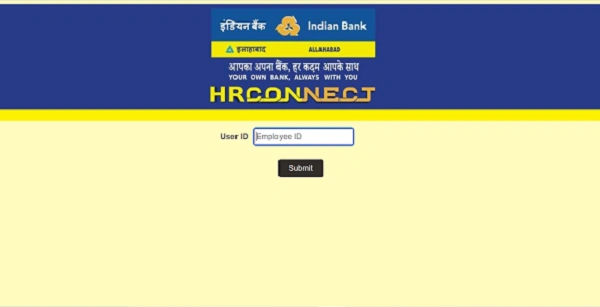
- User ID: Your unique Employee ID (issued by the HR/IT department)
- Password: Your secure HR CONNECT password
- 2FA Authentication: After entering your User ID and password, you will be required to enter a One-Time Password (OTP) sent to your registered mobile/email as part of multi-factor authentication.
The multi-stage login ensures that your personal HR data stays safe and secure.
How to Log In (Step-by-Step)
Follow these steps to reach your HRMS dashboard:
- Open your browser and visit indianbank.bank.in.
- Enter your User ID (Employee ID).
- Click Submit to proceed with authentication.
- You will be prompted for your password.
- After entering your password, an OTP will be sent to your registered mobile/email.
- Enter the OTP to complete Two-Factor Authentication (2FA).
- Once authenticated, your HR CONNECT dashboard will load and you can access all services.
Key Features for Employees
HR CONNECT is a full-service HR platform for active employees and pensioners, integrating many personnel and administrative functions.
Payroll & Finance
- View and download monthly payslips and annual Form 16.
- Access income tax and TDS declaration tools.
Leave Management
- Apply online for Casual Leave, Earned Leave, Sick Leave, and other leave types.
- Track leave balances and approval status in real time.
Reimbursements
- Submit claims for medical, conveyance, and other allowable staff expenses.
Service Records
- Access your digital service book with details on postings, promotions, and performance history.
Pensioner Access
- Retired staff can view pension slips and submit Digital Life Certificates
Announcements & Circulars
- Stay updated with bank circulars, policy changes, and internal HR announcements.
Mobile Access (IndOASIS App)
Indian Bank offers a mobile employee experience via the IndOASIS app:
- App on Android & iOS: Available on Google Play Store and Apple App Store.
- HR Features: Some HRMS functions — such as payslip viewing and leave applications — may be accessible through the “Staff Portal” or HRMS icon inside the IndOASIS app.
This gives employees convenient access to core HR services from their smartphones.
Troubleshooting and Support
Here’s how to handle common access issues:
Login Issues
- If the HRMS page doesn’t load or shows a security warning, ensure you’re using a secure connection — either the bank’s internal network or a verified VPN connection.
Forgot Password
- Use the “Forgot Password?” option on the login page.
- You may need to provide your User ID and verify identity via OTP to reset the password.
Persistent Errors
- For ongoing technical glitches, contact the CO: HRM Department or the IT Helpdesk at Indian Bank’s corporate office in Chennai.
Benefits of HR CONNECT
From an HR and employee standpoint, HR CONNECT provides several advantages:
1. Unified Access
All HR services — from payroll and leave to performance and pensions — are available through one portal.
2. Transparency
Employees can personally access their records without calling HR.
3. Real-Time Updates
Leave approvals, payroll updates, and announcements reflect instantly.
4. Secure Login
Multi-factor authentication protects sensitive HR data.
5. Access for Retirees
Former employees can use HR CONNECT to manage pension and life certificate tasks online.
Conclusion
HR CONNECT is Indian Bank’s unified HRMS portal designed to support employees and pensioners with key HR functions. From payroll and leave management to service records and pension services, it brings multiple administrative tasks into one secure, digital workspace.
For Indian Bank staff and retirees alike, HR CONNECT provides a modern, transparent, and convenient way to manage professional and personal HR needs in 2026.
Frequently Asked Questions (FAQs)
Q1. Who can use HR CONNECT?
All current Indian Bank employees and registered retirees (including alumni from the Allahabad Bank merger) with valid credentials.
Q2. Can I download old payslips?
Yes — payslips and Form 16 documents from previous years remain available once you log in.
Q3. Is mobile access available?
Yes — via the IndOASIS app or mobile browser, though full features may be better accessed on desktop.
Q4. What if my mobile number isn’t registered for OTP?
You need to update your mobile number with the HR/IT helpdesk so OTPs can be delivered.
Q5. Is the login URL the same for employees and pensioners?
Yes — both use hrconnect.indianbank.bank.in, but specific modules for pensioners may be visible only after login.