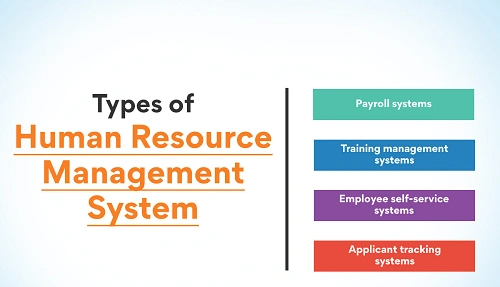
Paschim Banga Gramin Bank (PBGB), a leading Regional Rural Bank in West Bengal sponsored by UCO Bank, manages a large workforce spread across branches and regional offices. To simplify HR operations and improve transparency, the bank uses a centralized digital platform known as PBGB HRMS.
It is the official HR platform for employees and retirees of Paschim Banga Gramin Bank. It centralizes staff information such as salary slips, PF details, leave records, service books, and pension data into a single digital system.
Each user logs in using their Employee ID or PF Number, which connects all professional and financial records into one secure dashboard. This removes manual paperwork and reduces dependency on branch HR desks.
PBGB HRMS Portal Login Process
Employees can access HRMS through: https://hrms.pbgbank.com
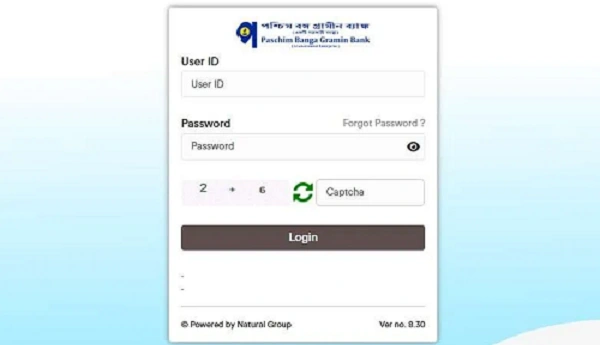
Official Login Details
- User ID: Employee ID / PF Number
- Password: Secure personal password provided by PBGB
How to Login (Step by Step)
- Open your browser and visit pbgbank.com.
- Enter your Employee ID or PF Number.
- Type your Password.
- Click Login to reach your dashboard.
For sensitive actions such as password changes, the bank may require OTP-based Two-Factor Authentication (2FA).
Key Features of PBGB HRMS
PBGB HRMS provides full Employee Self-Service functionality.
1. Payroll Services
Download monthly salary slips, check PF contribution details, and view tax computations.
2. Leave Management
Apply online for Casual Leave, Earned Leave, or Sick Leave and track approval status in real time.
3. Digital Service Records
Access your e-Service Book, which includes career progression, current posting, and personal information.
4. Circulars & HR Policies
Stay updated with internal bank circulars, promotion notices, and HR policy updates.
5. Retirement Benefits
Retired staff can track pension status and post-employment benefits directly through HRMS.
First-Time Login and Security Tips
Browser Choice
For best performance, use the latest version of Google Chrome or Microsoft Edge.
Password Reset
If you’re logging in for the first time or forgot your password:
- Click “Forgot Password?” on the login page.
- Verify your identity using your registered mobile number.
- Set a new password as prompted.
Troubleshooting Common Issues
| Issue | Recommended Action |
| Account Locked | Accounts may lock after 3–5 failed attempts. Contact your Regional HR administrator to unlock. |
| OTP Not Received | Ensure your mobile number is updated in the bank’s CBS system. |
| Data Errors | For Service Book or payroll corrections, submit a formal request to your Regional Office (RO) or Head Office. |
Frequently Asked Questions (FAQs)
Q1. Who can use PBGB HRMS?
Serving employees and registered retirees of Paschim Banga Gramin Bank.
Q2. Can I download old payslips?
Yes. Previous salary slips remain accessible after login.
Q3. Is OTP mandatory?
OTP may be required for sensitive operations like password changes.
Q4. What if my service details are incorrect?
Report discrepancies to your RO or Head Office for official correction.
In conclusion, PBGB HRMS has become the digital backbone of workforce management at Paschim Banga Gramin Bank. By bringing payroll, leave, service records, circulars, and retirement benefits into one system, it replaces manual HR processes with secure, modern efficiency.