The Government of West Bengal manages one of India’s largest state workforces, spread across education, health, police, administration, and development departments. To bring payroll, HR services, and employee records under one digital roof, the Finance Department operates a centralized system known as WBIFMS HRMS.
WBIFMS HRMS is the official HR and finance platform for Government of West Bengal employees. It connects individual personnel services with treasury-backed financial systems, creating a single digital profile for every employee.
Each user logs in using an 8-digit HRMS ID, which links salary, tax, leave, loans, and appraisal data into one secure dashboard. This replaces manual files and branch-level paperwork with a transparent online workflow.
Access is restricted to authorized government employees and designated officers.
WBIFMS HRMS Portal Login Process
Employees can access HRMS through: https://www.wbifms.gov.in/
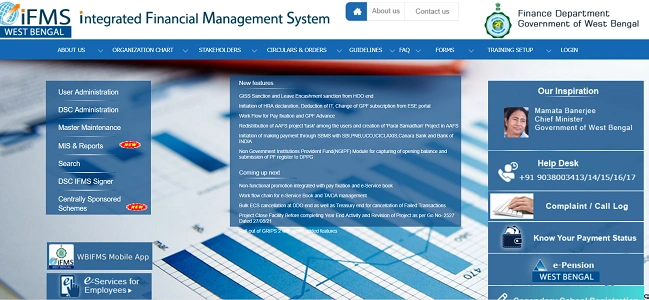
Navigate to e-Services for Employees
Official Login Details
- User / HRMS ID: 8-digit Employee Identification Number
- Password: Secure personal password
How to Login (Step by Step)
- Open your browser and visit gov.in.
- Click on e-Services for Employees.
- Enter your HRMS ID.
- Type your Password.
- Click Login to reach your dashboard.
New users can use the Signup for Registration option on the login page to create credentials.
Key Features of WBIFMS HRMS
WBIFMS works as both an Employee Self-Service and an Administrative platform.
1. Payroll & Taxes
Download monthly payslips, view Income Tax statements, and access historical salary records.
2. Loans & Advances
Apply for government loans and track sanction status directly through the portal.
3. Leave & Travel
Submit leave applications and monitor approvals for:
- TA (Travelling Allowance)
- DA (Dearness Allowance)
- LTC (Leave Travel Concession)
4. Self Appraisal (SAR)
Officers can complete their Self Appraisal Reports online without physical forms.
5. Administrative Roles
Officials such as HOO, AA, and DAA can perform role-based duties like approvals and verifications using their HRMS credentials.
Security Advisories and Best Practices
The Finance Department strongly recommends the following precautions:
1. Keep Software Updated
Always use the latest browser and operating system versions.
2. Enable Malware Protection
Use reliable antivirus and anti-ransomware tools.
3. Avoid Unauthorized Programs
Remove outdated or suspicious software from your device.
4. Protect Credentials
Never save your HRMS ID or password in browsers. Avoid public Wi-Fi or shared systems for HRMS access.
These steps help protect sensitive payroll and service data.
Troubleshooting and Support
1. Forgot Password
Use the Forgot Password link on the login page. Reset is done via your registered mobile number.
2. New Registration
Select Signup for Registration if your account is not yet created.
3. Technical Assistance
For ongoing issues, contact:
- WBIFMS Helpdesk (Finance Department)
- Your local Treasury Office
They handle login failures, data discrepancies, and access permissions.
Frequently Asked Questions (FAQs)
Q1. Who can use WBIFMS HRMS?
All registered Government of West Bengal employees and authorized officers.
Q2. Can I download old payslips?
Yes. Previous salary records remain available after login.
Q3. Is HRMS used for official approvals too?
Yes. Role-based users handle administrative tasks within the same system.
Q4. What if my service data is incorrect?
Raise the issue through your department or treasury for formal correction.
In conclusion, WBIFMS HRMS has become the digital backbone of workforce and financial management for the Government of West Bengal. By combining payroll, leave, loans, appraisals, and administrative controls into one platform, it replaces fragmented systems with structured digital governance.