Managing the workforce of India’s largest public sector bank requires a strong digital backbone. With over 2.5 lakh active employees and millions of pensioners, the State Bank of India relies on its Human Resource Management System (HRMS) to handle payroll, leave, medical benefits, performance records, and retirement services.
Let’s walk through how SBI HRMS works, login steps, key features, benefits, and common FAQs.
What Is SBI HRMS?
SBI HRMS is the official digital HR platform of the State Bank of India. It centralizes employee and pensioner data into one system — covering service records, salary slips, leave management, tax documents, medical claims, and pension services.
Active staff use HRMS for daily HR activities, while retired employees access Pension Seva for pension slips, arrears details, and life certificate submission. SBI also provides a dedicated MyHRMS mobile app for on-the-go access.
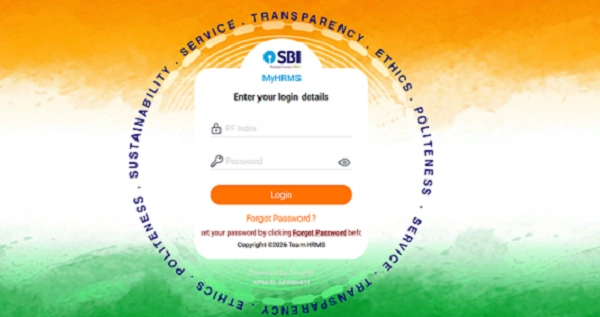
SBI HRMS Portal Login Process
Employees can log in through the official website: https://hrms.sbi.bank.in/
Pensioners may also use: https://www.sbi.co.in/web/pensioners
Steps to Login:
- Open your browser and visit sbi.bank.in.
- Enter your 7-digit PF Index Number as User ID.
- Type your ADS (Active Directory Services) password.
- Complete the captcha verification.
- Enter the OTP sent to your registered mobile number (mandatory 2FA for 2026).
- Click Login to access your dashboard.
Employees can also use the MyHRMS Mobile App (version 10.1 or higher) available on Android and iOS. After initial setup, access is secured through device binding and MPIN.
Forgot Password?
If you face login issues due to invalid credentials, reset your password via the ADS portal on SBI’s intranet or use the Forgot Password option on the HRMS login page.
Key Features of SBI HRMS
SBI HRMS is divided into multiple modules to support both active employees and pensioners.
1. MyHRMS Dashboard
A personalized dashboard showing employee profile, reporting structure, notifications, and quick links to HR services.
2. Payroll & Tax Services
Employees can download monthly payslips and Form 16. The 2026 upgrade introduces an automated Tax Projection tool, helping staff choose between old and new tax regimes.
3. Leave Management
Apply for LAP, Casual Leave, or Sick Leave directly from HRMS. The system also includes a Leave Encashment calculator for LTC/LFC planning.
4. Medical Benefits (Health Assist)
HRMS acts as the main gateway for SBI Health Assist (Mediclaim) renewals, premium payments, and policy tracking.
5. Pension Seva
Retired employees can view pension slips, arrears calculation sheets, and submit Video Life Certificates digitally without visiting branches.
Major Benefits of SBI HRMS in 2026
From an HRMS professional’s viewpoint, SBI HRMS brings strong operational advantages.
1. Enhanced Security
The migration to the .bank.in domain provides top-level encryption, making it extremely difficult for fake websites to mimic the portal. Two-factor authentication and device binding further strengthen security.
2. Paperless Reimbursements
Claims for furniture, briefcase, spectacles, and other reimbursements are now processed fully online, with direct credit to the salary account.
3. Faster HR Processes
Routine activities such as payslip downloads, leave applications, and tax planning now take minutes instead of days.
4. Anywhere Access
Employees and pensioners can access HRMS from home, office, or mobile devices, ensuring uninterrupted service.
5. HR Analytics for Managers
Controllers and branch managers receive real-time insights into staff strength, attendance, and deployment through integrated HR analytics.
Troubleshooting & Support
Here are common issues and solutions:
Problem: Invalid Credentials
Solution: Reset your password via ADS portal or use “Forgot Password”.
Problem: OTP Not Arriving
Solution: Ensure your mobile number is correctly mapped in CDO-15 records. Pensioners should contact their home branch.
Problem: Site Not Loading
Solution: Clear browser cache and cookies or try logging in through the MyHRMS mobile app using mobile data.
Important Note:
In 2026, SBI introduced Device Binding, meaning the MyHRMS app can only be used on one registered mobile device at a time.
Frequently Asked Questions (FAQs)
Q1. Who can use SBI HRMS?
All SBI employees and registered pensioners.
Q2. Is HRMS available on mobile?
Yes. The MyHRMS app supports secure mobile access with MPIN.
Q3. Can I download old payslips and Form 16?
Yes. Historical salary and tax documents are available in your dashboard.
Q4. What if my mobile number is not updated?
Contact your branch HR or pension branch to update records for OTP access.
Conclusion
SBI HRMS has become the digital backbone of workforce management at the State Bank of India. From salary slips and leave management to medical benefits and pension services, everything now flows through one secure platform.
With its upgraded security, paperless workflows, and mobile access, HRMS makes professional life easier for employees and smoother for retirees. Whether you’re an active staff member or a pensioner, keeping your details updated on hrms.sbi.bank.in ensures faster service and fewer complications.
In 2026 and beyond, SBI HRMS isn’t just an HR portal — it’s a core part of everyday banking life for SBI employees.
| HRMS Related Pages | |
| HRMS ODISHA | HRMS ESS KARNATAKA |
| HRMS HBL | HRMS KSFE |
| HRMS UCO BANK | HRMS MSSC |
| HRMS SBI | HRMS ASSAM |
| HRMS INDIAN RAILWAY | HRMS PNB |
| HRMS HARYANA | HRMS GLOBEX |