Modern organizations that operate across multiple sites and projects need more than basic HR tools. They require a system that connects employees, projects, attendance, and payroll in one place. PPMS Bandhu HR Portal was created for exactly this purpose.
The platform is designed to support companies that manage field teams, project-based staff, and distributed workforces. Instead of relying on manual registers, emails, or separate software for HR and operations, PPMS Bandhu brings everything under a single digital workspace.
Let’s walk through how PPMS Bandhu HRMS works, login steps, key features, benefits, and common FAQs.
PPMS Bandhu HR Portal Login Process
Access is limited to authorized users of organizations using the PPMS Bandhu system. Employees can access HRMS through: https://hrms.ppms.co.in
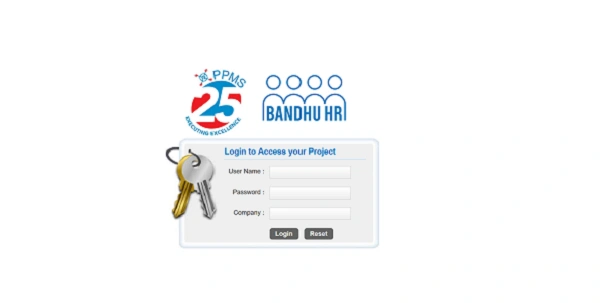
Official Login Details
- User Name: Employee Identifier
- Password: Secure personal password
- Company: Organization / Department Code
How to Login (Step by Step)
- Open your browser and visit ppms.co.in.
- In the Login to Access your Project section, enter your User Name.
- Enter your Password.
- Type your Company Name or Code.
- Click Login to reach your dashboard.
Use the Reset button if you need to clear all fields.
Key Features of PPMS Bandhu HRMS
PPMS Bandhu combines HR services with project operations.
1. Project Tracking
View assigned projects, milestones, and daily task updates directly from your dashboard.
2. Attendance & Leave Management
Digitally mark work hours, apply for leave, and track approval status.
3. Payroll Services
Download monthly payslips and access annual tax-related documents securely.
4. Employee Directory
Search colleagues and teams to support internal communication and coordination.
Benefits of PPMS Bandhu HRMS
From an HRMS professional perspective, the platform offers practical operational advantages.
1. Saves Time
Attendance, payslips, and project updates are handled online.
2. Improves Transparency
Employees can directly see assigned work, payroll data, and attendance records.
3. Paperless Operations
Most workforce processes move digital, reducing manual reporting.
4. Centralized Project Visibility
Managers and staff share a common view of project progress.
5. Secure Access
Login credentials and company codes help protect sensitive employee data.
Troubleshooting and Support
1. Incorrect Credentials
Ensure your Company Code is entered exactly as provided by your administrator.
2. Forgot Password or Technical Errors
For persistent login problems, contact your internal HR helpdesk.
Frequently Asked Questions
Q1. Who can use PPMS Bandhu HRMS?
Employees of organizations using the PPMS Bandhu platform.
Q2. Can I download old payslips?
Yes. Previous payroll records remain available after login.
Q3. Is this system only for HR?
No. It also supports project tracking and daily operations.
Q4. What if I don’t know my Company Code?
Contact your HR department.
Overall, PPMS Bandhu HRMS brings workforce management and project execution together on one platform. By combining attendance, payroll, employee records, and task tracking, it replaces fragmented systems with a unified digital workflow.