The Government of Odisha has taken a major step toward digital governance through its Human Resource Management System (HRMS). Commonly known as HRMS Odisha, this online portal helps manage employee records, salary details, leave applications, service books, and many other HR-related services for state government staff.
Earlier, most of these processes depended on paperwork and physical office visits. Today, with hrmsodisha.gov.in, employees can handle important tasks online in just a few clicks. The portal brings transparency, saves time, and simplifies everyday administrative work.
Let’s understand how HRMS Odisha works, how to log in, its main features, benefits, and answers to common questions.
What Is HRMS Odisha?
HRMS Odisha is an official digital platform created for Odisha government employees. It centralizes employee data such as personal details, posting history, promotions, leave records, salary information, loans, and retirement-related documents.
The portal acts as a single system where departments and employees interact. From junior staff to senior officers, everyone uses the same platform for HR services. This reduces delays, avoids duplication of records, and ensures accuracy across departments.
HRMS Odisha Portal Login Process
Logging into HRMS Odisha is simple:
- Visit the official website: hrmsodisha.gov.in
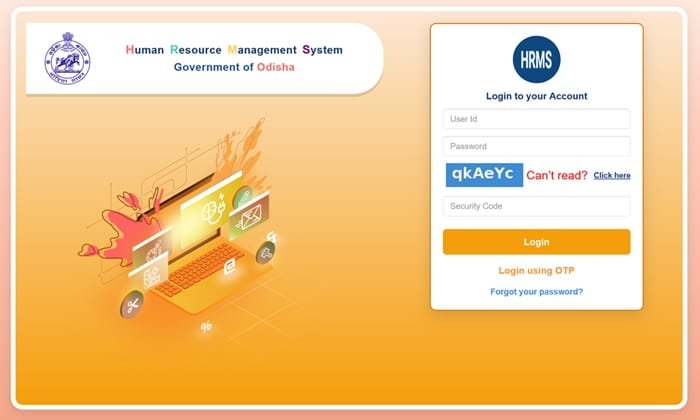
- Click on Personal Login from the homepage.
- Enter your User ID and Password.
- Fill in the captcha code displayed on the screen.
- Click Login.
Once logged in, you’ll reach your personal dashboard, where all available HR services are displayed.
Forgot Password?
If you forget your password, use the “Unable to Access My Account” option on the login page. You’ll be asked to verify basic details like your registered mobile number and date of birth to reset your credentials.
Key Features of HRMS Odisha
HRMS Odisha offers a wide range of tools designed to make employee management smoother and faster.
1. Digital Service Book
Employees can view their complete service history online, including appointments, transfers, promotions, and pay revisions. This eliminates the need for physical service books.
2. Online Leave Management
You can apply for leave, check leave balances, and track approval status directly through the portal.
3. Salary Slip Download
Monthly payslips are available for download anytime. This is useful for personal records, loan applications, or income proof.
4. Loan and Advance Requests
Employees can submit loan or advance requests online and monitor their progress without visiting HR offices.
5. Property Statement Submission
Annual property returns can be filed digitally, saving paperwork and ensuring timely compliance.
6. Employee Profile Management
Personal details such as address, contact number, and nominee information can be updated within the system.
7. Grievance and Request Tracking
Users can raise service-related issues and follow their status through the portal, improving accountability.
Benefits of HRMS Odisha
From an HRMS professional’s perspective, this system brings several practical advantages.
1. Saves Time and Effort
Routine tasks that once took days now take minutes. Employees no longer need to move files manually or visit multiple offices.
2. Improves Transparency
Every application—leave, loan, or update—can be tracked online. This reduces confusion and builds trust in the process.
3. Anytime, Anywhere Access
HRMS Odisha is web-based, so employees can log in from home, office, or any location with internet access.
4. Reduces Paperwork
The system promotes paperless administration, helping departments stay organized while supporting eco-friendly practices.
5. Better Data Security
Access is controlled through individual login credentials, and employee information is stored securely within the government system.
How To Register On HRMS Odisha Portal?
If you want to register on HRMS Odisha portal, please follow the below mentiond steps and register on HRMS Odisha Portal:
- Visit the official HRMS Odisha portal: https://hrmsodisha.gov.in/(or https://apps.hrmsodisha.gov.in/ for login).
- Click on Personal Login / HRMS Login.
- On the login page, select the Forgot Passwordor Unable to Access my Account / New User / First Time Login option (if available; many portals route first-time users through forgot password flow for activation).
- Enter your Employee ID / HRMS ID (10-digit or as provided by your department) and other required details like Date of Birth if prompted.
- Provide your registered mobile number (must be the one linked in HRMS records).
- An OTP will be sent to your registered mobile number.
- Enter and verify the OTP.
- Set a new password as per the guidelines (strong password required).
- Once set, use your Employee ID/HRMS ID (as username) and the new password to log in.
- After successful login, update your profile if prompted (e.g., Aadhaar, email, etc.).
Key Required Information/Documents for HRMS Profile Update/Completion
These are typically entered manually or used for verification; scanned uploads may be needed in specific modules like property statement or leave applications.
- Aadhaar Card— Aadhaar Number (highly recommended/encouraged for linking and fast pension processing).
- Aadhaar-linked Mobile Number— Must be registered/updated in HRMS for OTP-based login, password reset, and notifications.
- PAN Card— PAN Number (for tax-related details and profile completeness).
- Employee ID / HRMS ID— Your unique 10-digit or department-issued ID (mandatory for login/activation).
- Personal Details— Date of Birth, complete address, family details (spouse, children, nominees), cadre, designation, joining date, etc.
- Service Book / Appointment Letter— Details from your official appointment order or service records (for verifying/ updating legacy data).
- Bank Account Details— IFSC code, account number (linked for salary/loan/pension).
- Educational Qualifications & Certificates— If updating service book or profile (scans may be required in some cases).
- Nominee Details— For GIS, pension, etc. (names, relationships, shares).
- Other Supporting Documents(as applicable):
- Address proof (if updating residence).
- Medical certificate (for specific leave applications).
- Property details (for annual property statement submission).
How To Download Payslip on HRMS Odisha?
The HRMS Odisha Portal allows Government of Odisha employees to view and download their monthly payslips (also called salary slips or pay slips) online after logging in. Payslips are generated automatically based on salary transactions and are available month-wise.
- Visit the official HRMS Odisha login page: https://apps.hrmsodisha.gov.in/.
- Log in using your credentials:
- Enter your Employee ID / HRMS ID (as username).
- Enter your password, or use Login using OTP (send OTP to your registered mobile number and verify).
- Complete CAPTCHA if prompted.
- After successful login, you will land on the My Pagedashboard.
- Look for the My Report box/section (usually on the dashboard or sidebar).
- Click on the My Pay-Slip Browser link (or similar option like “My Payslip” / “Pay Slip Browser” in some interfaces).
- A list of available payslips will appear, showing month-year wise details including Basic Pay, Total Allowance, Gross Pay, Total Deduction, and Net Pay.
- Select the specific month/year for which you want the payslip.
- Click the View link (or equivalent) in the right-most column for that row.
- The payslip will open in a new window or pop-up.
- To download/save:
- Click the Rich Print button (for PDF generation).
- Or use browser options: Click Pop-Out→ then File → Print (to save as PDF via print dialog).
- Alternatively, use Ctrl+P (or browser print) and select “Save as PDF”.
- Save the PDF file to your device for records or printing.
How to Apply Leave Application in HRMS Odisha?
The HRMS Odisha Portal enables Government of Odisha employees to apply for various types of leave (e.g., Earned Leave, Casual Leave, Half Pay Leave, Maternity/Paternity Leave, etc.) online through the system. Leave applications are submitted digitally, forwarded to the concerned authority (e.g., DDO/Head of Office) for sanction, and you can track the status.
- आधिकारिक HRMS ओडिशा लॉगिन पेज पर जाएँ: https://apps.hrmsodisha.gov.in/.
- अपनी क्रेडेंशियल्स से लॉगिन करें:
- Employee ID / HRMS ID (यूजरनेम) दर्ज करें।
- पासवर्डडालें, या Login using OTP चुनें (रजिस्टर्ड मोबाइल पर OTP आएगा; वेरिफाई करें).
- CAPTCHA पूरा करें यदि दिखे.
- लॉगिन के बाद My Page डैशबोर्ड पर पहुँचेंगे
- बाईं ओर मेन्यू (लेफ्ट पेन) में Request or Apply फोल्डर/सेक्शन ढूंढें
- Leave(या Leave Application / Leave Management) पर क्लिक करें
- दाईं ओर लीव एप्लीकेशन विंडो खुलेगी, जिसमें पिछले एप्लीकेशनों की लिस्ट दिखेगी (स्टेटस चेक करने के लिए)
- नई लीव अप्लाई करने के लिए लिस्ट के नीचे बाईं ओर Apply बटन क्लिक करें
- लीव एप्लीकेशन फॉर्म भरें:
- Type of Leaveड्रॉपडाउन से चुनें (जैसे Casual Leave, Earned Leave आदि)
- From Date और To Date दर्ज करें
- यदि लॉन्ग-टर्म लीव या हाफ-डे है तो निर्दिष्ट करें
- Reason for Leave लिखें
- यदि जरूरी हो तो Headquarter Leaving Permission अप्लाई करें और अनुपस्थिति के दौरान संपर्क पता दें
- आवश्यक दस्तावेज़ अपलोड करें (जैसे मेडिकल सर्टिफिकेट)
- डिटेल्स चेक करें (लीव बैलेंस दिख सकता है)
- नीचे बाईं ओर Save या Submit क्लिक करके सबमिट करें
- सबमिट होने पर एप्लीकेशन आपके अप्रूविंग अथॉरिटी (DDO/हेड) को फॉरवर्ड हो जाती है
- स्टेटस उसी सेक्शन में लिस्ट से या रिपोर्ट्स से ट्रैक करें
How to Submit Property Return in HRMS Odisha?
HRMS Odisha Portal पर प्रॉपर्टी रिटर्न (Annual Property Statement या Immovable/Movable Property Return) सबमिट करना ओडिशा सरकार के सभी कर्मचारियों (Group A से D तक) के लिए अनिवार्य है। यह Odisha Government Servants’ Conduct Rules के तहत हर साल जनवरी में (आमतौर पर 31 जनवरी तक, एक्सटेंशन हो सकता है) सबमिट किया जाता है। इसमें खुद, पति/पत्नी और आश्रित बच्चों/निर्भरों के नाम वाली movable और immovable संपत्तियों (जमीन, मकान, वाहन, शेयर, ज्वेलरी आदि) की घोषणा की जाती है, जो 1 जनवरी (या पिछले वर्ष की 31 दिसंबर) की स्थिति के अनुसार होती है।
- आधिकारिक HRMS ओडिशा लॉगिन पेज पर जाएँ: https://apps.hrmsodisha.gov.in/ या https://hrmsodisha.gov.in
- अपनी क्रेडेंशियल्स से लॉगिन करें:
- Employee ID / HRMS ID (यूजरनेम) दर्ज करें
- पासवर्ड डालें, या Login using OTP चुनें (रजिस्टर्ड मोबाइल पर OTP आएगा; वेरिफाई करें)
- CAPTCHA पूरा करें यदि दिखे।
- लॉगिन के बाद My Page डैशबोर्ड पर पहुँचेंगे
- दाईं ओर या साइडबार में Request or Apply/ Request or Submission बॉक्स/सेक्शन ढूंढें
- Property Statementलिंक पर क्लिक करें (कभी-कभी “Property” या “Property Statement” के रूप में)
- प्रॉपर्टी स्टेटमेंट डैशबोर्ड खुलेगा, जिसमें पिछले सबमिशन/स्टेटस दिखेंगे
- नए वर्ष के लिए सबमिट करने हेतु Add New बटन क्लिक करें (या “Create New”/”Add Property Record”)
- चुने गए वर्ष के लिए नया फॉर्म/एंट्री बनेगी
- डिटेल्स भरें:
- सभी movable और immovable प्रॉपर्टी घोषित करें (भूमि, मकान, वाहन, शेयर, ज्वेलरी आदि)
- स्वयं, पति/पत्नी, आश्रित बच्चों/निर्भरों के नाम वाली एसेट्स शामिल करें
- विवरण जैसे विवरण, स्थान, मूल्य (निर्धारित तिथि पर), अधिग्रहण मोड आदि दें
- आधिकारिक Property Statement Format का पालन करें
- यदि जरूरी हो तो दस्तावेज़/स्कैन अपलोड करें
- सभी जानकारी चेक करें और सही सुनिश्चित करें
- नीचे Save/ Submit क्लिक करके सबमिट करें
- सबमिट होने पर यह आपके अप्रूविंग अथॉरिटी/DDO को फॉरवर्ड हो जाता है
- स्टेटस उसी सेक्शन में या http://apps.hrmsodisha.gov.in/PropertyStatementStatus.htm से ट्रैक करें
Frequently Asked Questions (FAQs)
Q1. Who can use HRMS Odisha?
Only Odisha government employees who have been registered in the system and provided login credentials.
Q2. Can HRMS be accessed on mobile?
Yes. The portal works on mobile browsers, though a desktop or laptop offers better visibility.
Q3. Why does login sometimes fail?
Login issues usually occur due to incorrect credentials, captcha errors, or CAPS LOCK being enabled.
Q4. Is salary information available for past months?
Yes. Employees can access previous payslips and salary records from their dashboard.
Q5. What should I do if my details are incorrect?
You can request corrections through your department or update certain fields directly from your profile, depending on access rights.
Conclusion
HRMS Odisha is a strong example of how digital systems can simplify government administration. By bringing employee services online, the portal has reduced paperwork, increased transparency, and made HR processes faster and more reliable.
From checking payslips to managing leave and viewing service records, everything is now available on one platform. For Odisha government employees, hrmsodisha.gov.in isn’t just a website—it’s a daily work companion that saves time and removes unnecessary stress.
If you’re part of the Odisha state workforce, learning to use HRMS effectively can make your professional life much easier.
| HRMS Related Pages | |
| HRMS ODISHA | HRMS ESS KARNATAKA |
| HRMS HBL | HRMS KSFE |
| HRMS UCO BANK | HRMS MSSC |
| HRMS SBI | HRMS ASSAM |
| HRMS INDIAN RAILWAY | HRMS PNB |
| HRMS HARYANA | HRMS GLOBEX |