Medicover Hospitals India operates a fast-growing healthcare network with doctors, nurses, technicians, and administrative staff working across multiple cities. To manage this workforce efficiently, the organization uses a centralized digital platform known as Medicover HRMS.
This Human Resource Management System handles everything from onboarding to resignation and serves as the primary tool for daily HR activities such as payroll, leave, performance reviews, and employee records.
Let’s walk through how Medicover HRMS works, login steps, key features, benefits, and common FAQs.
What Is Medicover HRMS?
Medicover HRMS is the official internal HR platform for employees of Medicover Hospitals India. It centralizes employee data such as salary slips, attendance, leave balances, KRAs, training records, and exit processes.
Each staff member logs in using their Employee ID, which links all professional information into a single dashboard. This allows hospital and corporate teams to manage HR tasks without manual paperwork.
Access is restricted strictly to authorized Medicover employees.
Medicover HRMS Portal Login Process
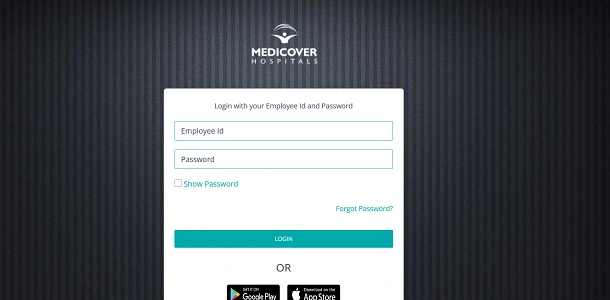
Employees can access HRMS through: https://3.7.119.125/hrms/
Mobile Apps: Sahrudaya Emp or Medicover Employee (Google Play)
Important Browser Note
Because the web portal uses an IP-based link, your browser may display a “Your connection is not private” warning. In most cases, you must click Advanced and then Proceed to reach the login page.
Official Login Details
- User ID: Employee ID
- Password: HRMS password set during onboarding
How to Login (Step by Step)
- Open your browser and visit 7.119.125/hrms/.
- Enter your Employee ID.
- Type your Password.
- Click Login to access your dashboard.
Once logged in, employees can manage payslips, leave, KRAs, and service records.
Key Modules & Features of Medicover HRMS
Medicover HRMS is divided into multiple Employee Self-Service sections.
1. Employee Self-Service (ESS)
- Payroll: Download monthly salary slips
- Leave Management: Apply for leave, track attendance summaries, and request Comp Off
- Service Records: Update personal details and bank information
2. Performance Management System (PMS)
- KRA Management: Add 5–8 Key Result Areas annually and record achievements
- Ratings: View annual performance ratings and behavioral feedback from managers
3. Training & Employee Directory
- Know Your Newbie: Guides for newly joined staff
- Directory: Search colleagues across locations such as Hyderabad, Bangalore, Kurnool, and others
4. Resignation & Exit Module
Submit resignation online and track No Dues Clearance across departments until final settlement.
How to Reset Medicover HRMS Password
If you forget your password:
- Click “Forgot Password?” on the login screen.
- Enter your Employee ID, Date of Birth, and Registered Contact Number.
- Complete verification and set a new password as instructed.
Benefits of Medicover HRMS
From an HRMS professional perspective, the platform offers several practical advantages.
1. Saves Time
Payslips, leave requests, KRAs, and resignations are handled online, reducing HR desk visits.
2. Improves Transparency
Employees can directly view attendance, payroll, and appraisal data.
3. Paperless HR
Most HR workflows are digital, minimizing manual forms.
4. Centralized Workforce Management
HR teams get a unified view of employees across hospitals and offices.
5. Career Visibility
KRA tracking and ratings help employees understand performance expectations clearly.
Conclusion
Medicover HRMS plays a central role in managing the hospital group’s workforce. By combining payroll, leave, KRAs, training, and exit processes into one system, it replaces manual HR operations with digital efficiency.
For Medicover employees, the HRMS portal and mobile apps are now essential tools for managing professional life in 2026.
Frequently Asked Questions
Q1. Who can use Medicover HRMS?
Only employees of Medicover Hospitals India.
Q2. Can I download old payslips?
Yes. Previous salary slips remain accessible after login.
Q3. Is the mobile app mandatory?
No, but it’s useful for quick access on the go.
Q4. What if the site shows a security warning?
Click Advanced → Proceed to open the HRMS page.