The Government of Karnataka manages a large workforce across departments, districts, and institutions. To simplify employee services and move away from manual paperwork, the state introduced HRMS ESS (Employee Self-Service) — a digital platform that allows government staff to manage their professional records online.
hrmsess.karnataka.gov.in portal is part of Karnataka’s broader Human Resource Management System, managed by the Centre for e-Governance (CeG). As of 2025–2026, HRMS ESS has become the primary gateway for employees to access salary details, service books, leave records, and transfer-related documents without visiting administrative offices.
Let’s walk through how HRMS ESS Karnataka works, login steps, key features, benefits, and common FAQs.
What Is HRMS ESS Karnataka?
HRMS ESS Karnataka is the official Employee Self-Service portal for Karnataka government employees. It centralizes employee data such as salary information, service history, leave balances, transfers, and pension-related deductions.
Each employee uses their KGID Number (Karnataka Government Insurance Department ID) as the login credential. This number links all service-related data into a single electronic record. The portal also connects with payroll systems to reflect GPF or NPS deductions and salary credits.
Employees can also access services through mobile apps like KA-HRMS or K-Parivara, available on the Google Play Store.
HRMS ESS Karnataka Portal Login Process
Employees can log in through: https://hrmsess.karnataka.gov.in/
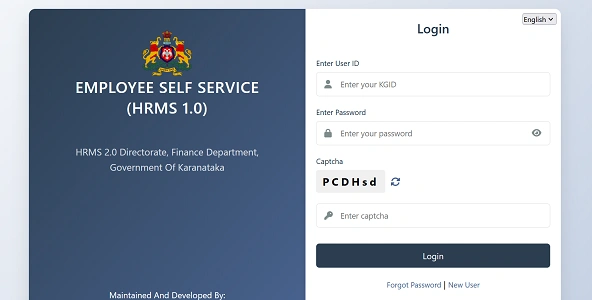
Official Login Details
- User ID: KGID Number
- Password: Self-created password
- Mobile Apps: KA-HRMS / K-Parivara
How to Login (Step by Step)
- Visit karnataka.gov.in in your browser.
- Choose your preferred language — Kannada or English.
- Enter your User ID (KGID Number).
- Type your Password.
- Enter the Captcha shown on screen.
- Click Login.
- A 6-digit OTP will be sent to your registered mobile number.
- Enter the OTP to access your personalized dashboard.
OTP verification adds an extra security layer and is now standard for most departments.
Key Features of HRMS ESS Karnataka
HRMS ESS offers multiple self-service modules designed to reduce office visits and speed up HR processes.
1. E-Salary & Payslips
Employees can view and download:
- Monthly payslips
- Annual salary statements
- GPF or NPS deduction details
This makes income verification and personal record keeping much easier.
2. Electronic Service Book (e-SB)
The digital service book contains complete career history, including:
- Appointment details
- Promotions
- Transfers
- Training records
Employees can view their service data anytime without relying on physical files.
3. Leave Management
Apply online for Casual Leave (CL), Earned Leave (EL), or Commuted Leave, and track approval status from your reporting officer.
4. LPC & Transfers
Download your Last Pay Certificate (LPC) during transfers and view official transfer orders directly from the portal.
5. Annual Property Returns
Many departments require employees to file assets and liabilities statements annually through HRMS ESS, making compliance completely digital.
Benefits of HRMS ESS Karnataka
From an HRMS professional perspective, the portal delivers strong operational advantages.
1. Saves Time
Routine tasks like downloading payslips or checking service records now take minutes instead of multiple office visits.
2. Improves Transparency
Employees can see their own postings, promotions, and leave balances, reducing confusion and dependency on manual registers.
3. Secure Access
OTP-based login ensures sensitive employee data remains protected.
4. Anywhere Availability
Being web-based, HRMS ESS can be accessed from home, office, or any location with internet connectivity.
5. Paperless Administration
Electronic service books and online leave applications reduce paperwork and speed up approvals.
Frequently Asked Questions (FAQs)
Q1. Who can use HRMS ESS Karnataka?
All Karnataka government employees with a valid KGID Number and registered mobile number.
Q2. Is OTP mandatory for login?
Yes. A 6-digit OTP is sent to your registered mobile number for secure access.
Q3. Can I download old payslips?
Yes. Previous salary statements are available in the E-Salary section.
Q4. What if I forget my password?
Use the password recovery option on the login page or contact your departmental IT support.
Q5. Can I view my full service history online?
Yes. The Electronic Service Book shows your complete career record.
In conclusion, HRMS ESS Karnataka has transformed how government employees manage their service records and benefits. With digital payslips, electronic service books, online leave applications, and transfer documents all in one place, the portal replaces traditional paperwork with modern convenience.
| HRMS Related Pages | |
| HRMS ODISHA | HRMS ESS KARNATAKA |
| HRMS HBL | HRMS KSFE |
| HRMS UCO BANK | HRMS MSSC |
| HRMS SBI | HRMS ASSAM |
| HRMS INDIAN RAILWAY | HRMS PNB |
| HRMS HARYANA | HRMS GLOBEX |