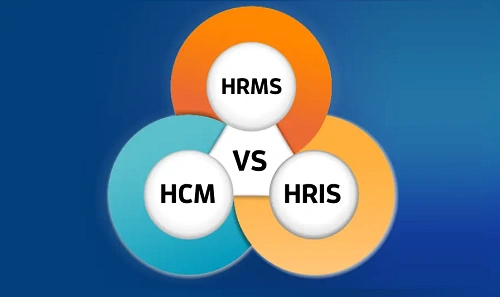
If you’ve ever searched for HR software, you’ve probably seen three terms used almost interchangeably: HRIS, HRMS, and HCM. Vendors mix them freely. Sales pages blur the lines. Even HR professionals sometimes use them as synonyms.
But they’re not exactly the same.
Each term reflects a different stage in how organizations think about people, data, and workforce strategy. Understanding the difference helps you choose the right system—and avoid paying for features you don’t need.
Let’s unpack this step by step.
First, Why These Terms Exist at All
HR technology didn’t evolve overnight. It grew in layers.
- Companies first needed a system to store employee data
- Then they wanted automation of HR processes
- Eventually, HR became strategic, focusing on talent, performance, and long-term workforce planning
HRIS, HRMS, and HCM map neatly to those stages.
What Is HRIS? (Human Resource Information System)
HRIS is the most basic form of HR software. Its primary job is to store, manage, and retrieve employee information.
Think of HRIS as a digital filing cabinet—structured, searchable, and far better than spreadsheets, but still administrative in nature.
Typical HRIS Features
- Employee personal data
- Job titles, departments, reporting structure
- Employment history
- Basic compliance records
- Standard HR reports
What HRIS Does Well
- Data accuracy: Keeps all employee records in one place
- Compliance support: Helps meet statutory and audit requirements
- Process consistency: Reduces manual record-keeping
Limitations of HRIS
- Limited automation: Few workflow-driven processes
- Minimal analytics: Mostly historical, not predictive
- Not strategic: Focuses on records, not performance or growth
Best Fit: Small organizations or early-stage companies that mainly need employee data management and compliance tracking.
What Is HRMS? (Human Resource Management System)
HRMS builds on HRIS by adding process automation and operational HR functions. If HRIS answers “Who is our employee?”, HRMS answers “How do we manage them day to day?”
Typical HRMS Features
- Everything in HRIS
- Payroll processing
- Attendance and leave management
- Benefits administration
- Recruitment and onboarding
- Employee self-service portals
Many modern HR platforms marketed today fall into this category, even if they use different labels.
What HRMS Does Well
- Automation: Reduces manual HR work
- Efficiency: Faster payroll, approvals, and reporting
- Employee experience: Self-service reduces HR dependency
- Operational control: Better handling of daily HR tasks
Limitations of HRMS
- Process-focused: Less emphasis on long-term talent strategy
- Reactive analytics: Reports what happened, not what will happen
- Customization limits: Especially in cloud-based systems
Best Fit: Small to mid-sized organizations that want to streamline HR operations without running multiple tools.
What Is HCM? (Human Capital Management)
HCM takes a fundamentally different view. It treats employees not just as resources to manage, but as human capital to develop, engage, and retain.
HCM systems cover the entire employee lifecycle, from hiring to exit—and everything in between.
Typical HCM Features
- Core HR and payroll
- Talent acquisition and workforce planning
- Performance management
- Learning and development (L&D)
- Succession planning
- Compensation planning
- Advanced analytics and dashboards
Enterprise platforms like Workday and SAP SuccessFactors are classic examples of HCM systems.
What HCM Does Well
- Strategic HR: Aligns people strategy with business goals
- Talent visibility: Identifies high performers and skill gaps
- Predictive insights: Uses data to forecast attrition and workforce needs
- Employee growth: Focus on learning, engagement, and retention
Limitations of HCM
- Cost: Higher licensing and implementation costs
- Complexity: Requires change management and training
- Overkill for small teams: Many features may go unused
Best Fit: Mid-to-large organizations that view HR as a strategic business function, not just an administrative one.
Side-by-Side Comparison
Focus Area
- HRIS: Data and records
- HRMS: HR operations and automation
- HCM: Talent, performance, and strategy
Scope
- HRIS: Narrow
- HRMS: Moderate
- HCM: Broad and holistic
Analytics
- HRIS: Basic reports
- HRMS: Operational insights
- HCM: Predictive and strategic analytics
Cost & Complexity
- HRIS: Low
- HRMS: Medium
- HCM: High
Why the Terms Are Often Confused
In practice, many modern cloud platforms bundle features across all three categories. Vendors may call the same product HRIS, HRMS, or HCM depending on marketing strategy.
For example:
- A small-business tool may label itself HCM but function mostly as HRMS
- An enterprise platform may include HRIS and HRMS features but brand itself purely as HCM
That’s why features matter more than labels.
How to Choose the Right One
Instead of asking, “Should I buy HRIS, HRMS, or HCM?”, ask these questions:
- Do we mainly need employee records and compliance? → HRIS
- Do we want to automate payroll, attendance, and HR workflows? → HRMS
- Do we want to build talent, plan succession, and use HR data strategically? → HCM
Also consider:
- Company size and growth plans
- HR maturity level
- Budget and internal expertise
- Readiness for change
Many organizations start with HRMS and evolve into HCM over time.
Final Thoughts
HRIS, HRMS, and HCM aren’t competing ideas—they’re layers of evolution.
- HRIS organizes information.
- HRMS manages processes.
- HCM shapes the future of your workforce.
Understanding the difference helps you invest wisely, set realistic expectations, and build an HR tech stack that actually supports your people and your business. The smartest choice isn’t about the biggest system—it’s about the right one for where you are today, and where you’re headed next.