Managing HR operations for one of India’s oldest and largest public sector banks demands a modern, secure digital system. The Punjab National Bank (PNB) HRMS serves this purpose. It acts as a centralised platform where PNB employees and pensioners can access payroll details, leave management, performance records, pension data, and HR services all in one place.
With the shift to digital-first processes and mandatory two-factor authentication (2FA) in 2026, HRMS PNB has become a vital tool for daily work life. Whether you’re downloading your payslip or checking leave balances, the portal and its companion mobile app make HR services faster and more transparent.
What Is HRMS PNB 2.0?
HRMS PNB is the Human Resource Management System used by Punjab National Bank’s staff and retirees. It’s designed to centralise employee information and provide nearly all routine HR services online.
From self-service options like profile updates to critical functions like pension access and performance appraisal, HRMS PNB acts like a mini HR office in your pocket. Employees use their PF number as the login ID, and all major HR needs are available through the portal or the PNB Parivar 2.0 mobile app.
Retirees and pensioners also benefit from dedicated pension modules that help track pension slips and life certificate status without needing branch visits.
HRMS PNB 2.0 Portal Login — Step-by-Step Guide
Employees and pensioners can sign into HRMS via the web or mobile app.
Official Login Details
- Web Portal: https://hrms.pnb.bank.in/
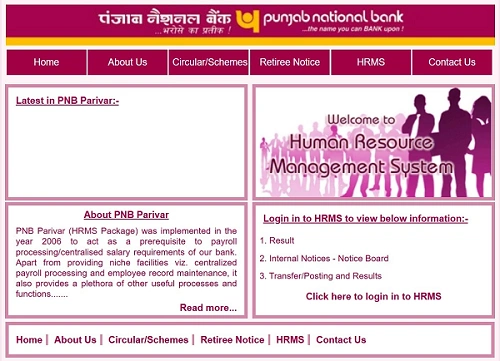
- Mobile App: PNB Parivar 2.0 (Available on Google Play & Apple App Store)
How to Login on HRMS PNB 2.0 (Web Portal)
- Open your browser and visit pnb.bank.in.
- Click on the HRMS/Login
- Enter your User ID (your PF Number).
- Type your HRMS/Parivar password (case-sensitive).
- Enter the Captcha text shown on screen.
- Complete 2FA by entering the OTP sent to your registered mobile number.
The login process now includes mandatory two-factor authentication (OTP) for 2026, improving security for all users.
Mobile App Login on HRMS PNB 2.0
- Download PNB Parivar 2.0 from your app store.
- After installation, enter your PF Number and password.
- Complete OTP verification.
- Optionally, set up biometric login (fingerprint or Face ID) where supported.
The app also supports Device Binding, meaning it can only be registered and used on one mobile device at a time — a security measure rolled out in 2026.
Key Features & Modules of HRMS PNB 2.0
PNB HRMS is structured with multiple modules that cover all major HR functions:
1. Self-Service (ESS)
Employees can view and update personal profile details, including contact information, address, and dependent data. ESS makes basic updates faster without any paperwork.
2. Payroll & Payslips
Access and download monthly salary slips. View annual income and tax projections, and download your Form 16 for tax filing.
3. Leave Management
Apply for various leave types such as Casual Leave (CL), Privilege Leave (PL), or Sick Leave. You can also view your real-time leave balance and track the approval status.
4. Reimbursements
Submit digital claims for allowances like newspaper, petrol, cleansing materials, and briefcase. The claims process is now paperless and integrated into the HRMS workflow.
5. Performance (PAF)
Access and submit your Performance Appraisal Forms (PAF). View appraisal feedback and promotion-related information directly on the portal.
6. Pension Services
Pensioners can view their pension slips and check the status of life certificate submission. The portal also supports pension-related calculations and records.
hrms PNB 2.0 Mobile App – What’s New in 2026 (PNB Parivar 2.0)
The updated 2026 version of the mobile app comes with several features:
- Biometric Login: Secure access using fingerprint or Face ID on compatible devices.
- e-Circulars: Browse official notices and bank communications in the app.
- SAATHI Module: Access employee benefit handbooks and welfare scheme details.
- Device Binding: For security, the app is registered to one device only.
These enhancements make it easier for employees to stay connected on the go.
Benefits of HRMS PNB
HRMS PNB brings several real operational advantages to the bank’s workforce.
1. Time-Saving and Convenience
Tasks that once required multiple office visits can now be completed online — from payslip downloads to leave applications.
2. Improved Transparency
Employees can see their own records, leave balances, reimbursement status, and appraisal details without ambiguity.
3. Security and Compliance
Mandatory two-factor authentication (OTP) and device binding ensure robust security for employee data. The system aligns with modern banking security standards.
4. Paperless Workflows
Claims, forms, and updates are processed digitally, reducing paperwork and processing delays.
5. Anywhere Access
HRMS can be accessed from any location with internet, making it ideal for on-the-move access or remote work.
Troubleshooting & Support
Here are common issues and how to resolve them:
Invalid OTP
- Ensure your mobile network is stable.
- Verify your correct mobile number is updated in the bank’s HR records.
Account Locked
- Use the Forgot Password link to reset via PF Number and OTP.
- If problems persist, contact HO HRMD support.
PDF Not Opening
- The 2026 HRMS version may require a modern PDF viewer.
- Install the latest Adobe Acrobat or another PDF reader.
Support Contacts
HRMS Support:
- 011-28075196 / 011-28075197
Head Office HRMD:
- HRMD Division, Plot No. 4, Sector 10, Dwarka, New Delhi
PNB HRMS 2.0 has become the digital backbone of workforce management at Punjab National Bank. With strong security measures, paperless workflows, and mobile access via Parivar 2.0, it makes HR services faster, clearer, and more secure.
From personal profile updates to leave management, pension services, and performance appraisal, everything now flows through one unified system. Whether you’re an active employee or a pensioner, using https://hrms.pnb.bank.in and the mobile app can simplify your professional life and help avoid avoidable delays.
PNB HRMS 2.0 Frequently Asked Questions (FAQs)
Q1. Who can use PNB HRMS 2.0?
Active employees and pensioners of Punjab National Bank with valid PF Number and password.
Q2. Is the portal mobile-friendly?
Yes. The PNB Parivar 2.0 mobile app supports complete HRMS functionality with biometric login.
Q3. Can I download old payslips and Form 16?
Yes — all historical salary and tax documents are available once you log in.
Q4. What if my mobile number for OTP is outdated?
Contact your branch HR to update your mobile number in the system.
| HRMS Related Pages | |
| HRMS ODISHA | HRMS ESS KARNATAKA |
| HRMS HBL | HRMS KSFE |
| HRMS UCO BANK | HRMS MSSC |
| HRMS SBI | HRMS ASSAM |
| HRMS INDIAN RAILWAY | HRMS PNB |
| HRMS HARYANA | HRMS GLOBEX |